SuperCom - MODBUS Protocol Library
for Windows and Linux
Modbus Library
Data transmission library using MODBUS Protocol Driver. MODBUS Communications via serial and TCP/IP. MODBUS RTU ASCII Modus. Modbus Library with Client-Server (former Master-Slave) support.
SuperCom MODBUS library is a developers library to be used with modern compiler like C, C++, C#, Delphi, Java, VB net, Python etc. in order to control Modbus aware plc. The SuperCom MODBUS library supports client and server (old: master/slave) RTU and ASCII through serial ports and TCP/IP.
C++ Modbus RTU Library supporting client and server. A C# Modbus RTU Library for serial and tcp/ip data connections.
Delphi Modbus RTU Library supporting serial and tcp/ip data connections under Windows and Linux .
Perform easily Modbus client-server device functionality in your application written for example with C++, C#, Delphi, LabVIEW, Pascal, Visual Basic (incl. NET, NET Core) or Java.
Modbus protocol library for TCP RTU over TCP. Bridge RTU over IP Gateway. Modbus for serial RS-485 library. MODBUS/TCP Master and Slave. Data Acquisition Products. MODBUS Protocol with LabView samples. Modbus Master Protocol library. Modbus bridging serial to TCP/IP. Serial MODBUS Library. MODBUS Library with Siemens S7.
Serial Communications and via TCP/IP MODBUS RTU ASCII Modus.
Modbus driver RTU and ASCII. Data transmission using MODBUS Protocol. Modbus Library.
Modbus TCP slave to Modbus Master converter. Connect a Master Modbus RTU RS232, RS485 with one or more Modbus TCP slaves / servers. Modbus master on serial and slaves on Ethernet (TCP).
Delphi MODBUS RTU & ASCII Unit, Bibliothek.
Delphi Unit supporting Modbus protocol library.
Labview Modbus library.
MODBUS Communication Library for Windows
MODBUS Communication Library for Linux
Samples for Modbus RTU Client / Server. Modbus protocol samples written in C, C++, C#, Delphi, Pascal, Java, .NET, Python, Visual Basic, VB net.
MODBUS protocol Library & Components
MODBUS Protocol Library
Windows, Linux
Library, Component, ActiveX, Unit
C#, C / C++, Delphi, Java, Pascal, Python, Visual Basic, VB net
SuperCom Suite, SuperCom Serial Library incl. MODBUS, SuperCom for TCP/IP incl. MODBUS
MODBUS RTU,MODBUS ASCII Modus, MODBUS TCP. Data transmission library using MODBUS Protocol Driver. Modbus TCP slaves / server. Modbus for TCP RTU over TCP. Bridge RTU over IP Gateway
Home
 ADONTEC
MODBUS Software Development, Serial Data Communication, TCP/IP Client Server
ADONTEC
MODBUS Software Development, Serial Data Communication, TCP/IP Client Server
SuperCom MODBUS Protocol Library
MODBUS is an industrial data communication protocol used to control PLC's and automation machines connected through serial lines (RS-232, RS-422, RS-485) or Ethernet TCP/IP connections.
The SuperCom MODBUS protocol library supports fast direct reading of Modbus data. Reading or modifying registers, coils, inputs etc. Direct data communication via Modbus TCP or Modbus serial and operation mode Modbus RTU, Modbus ASCII, Modbus TCP etc.
SuperCom MODBUS library is a developers library to be used with modern compiler like C, C++, C#, Delphi, Java, LabView, Pascal, Python, VB net, etc. in order to control Modbus aware plc. The SuperCom MODBUS library supports client and server mode of operation and data transfer in RTU and ASCII mode through serial ports and TCP/IP.
The SuperCom MODBUS Protocol Library contains functions for sending and receiving data via serial or TCP/IP connections to devices respecting the MODBUS protocol.
The SuperCom MODBUS Protocol Library is a very complete and mature MODBUS library and provides a rock solid foundation to develop fast robust MODBUS capable applications. The SuperCom MODBUS Protocol Library hides the complex MODBUS protocol offering one easy to use set of functions (API) that communicate data packets over serial and TCP/IP connections thus saving valuable time, reducing costs and ensuring quality results.
Perform easily client or server device functionality in you application written for example with C, C++, C#, Delphi, Visual Basic (incl. NET), Java, LabView etc. Many samples included.


The SuperCom MODBUS Protocol Library supports data communication between devices connected to a serial port, on a bus system or network (TCP/IP). The protocol module supports ASCII and RTU (Remote Terminal Unit) operation mode (ASCII mode transfers ASCII codes and RTU binary data bytes in binary mode).
Run up to 255 simultaneous connections with Modbus devices. Each application can open and control up to 255 Modbus devices at the same time. SuperCom functions are thread-safe and work smoothly and particularly quickly even on the most modern multi-core CPUs.
There is only one API to learn! The same functions used with Serial, TCP/IP or ISDN type of connections and operation mode (Modbus ASCII, Modbus RTU, Modbus TCP).
The SuperCom MODBUS Protocol Library also supports custom function codes and data packets by implementing functions that communicate transparently. Controlling machine specific extensions is realy easy using these functions.
Easy to use, stable and fast
The SuperCom software is particularly valued by industrial customers for its stability and speed. More than 30 years SuperCom software is supporting industrial customers in rough environment, often with strictly timing requirements.
There is only one API to learn! The same functions and parameters used with serial, TCP/IP or ISDN type of connections.
An existing project is quickly expanded to exchange data with a Modbus-capable PLC or controller. Additional functions are included to meet a wide range of requirements. Many examples are included.
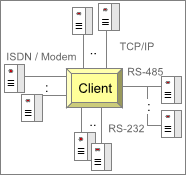
- Run a single or multiple simultaneous connections to modbus devices (up to 255 connections per application).
- Runs smoothly even if multiple concurrently executing connections.
- Run multiple Modbus masters.
- Very short reaction times. Achieve transaction times of 2 ms (or less) per request. (See also PDF)
- Functions optimized for high data throughput.
- One common and portable API across Windows, Linux, serial, TCP/IP etc.
- Connect one or more MODBUS RTU or ASCII clients to one or more Modbus servers.
- Modbus device simulation incl. samples.
- Functions optimized for high data throughput.
- Depending on the SuperCom software used, the SuperCom MODBUS protocol module can control multiple serial and/or TCP/IP connections simultaneously.
- A MODBUS server created with the SuperCom MODBUS Protocol Library can handle up to 254 client connections concurrently (samples included).
- The SuperCom MODBUS Protocol Library can control, based on the used SuperCom software, serial and/or TCP/IP connections.
- The SuperCom MODBUS Protocol Library can run concurrently connections thus polling more than one plc the same time is possible.
- Receive Modbus data packets and simulate one or more MODBUS slaves or Protocol Gateway.
- Create your own Modbus Gateway or Bridge to route data between serial interface and TCP/IP network, for example a MODBUS TCP to MODBUS RTU Gateway.
- Use SuperCom for Modbus bridging (e.g. serial to TCP/IP).
- Create your own Protocol Gateway using one of the other SuperCom industrial protocols (PLC protocols) offered or use your own custom protocol.
- Create your own Modbus Server (e.g. simulate devices) that can handle requests on its own or handed over to the application (manual mode) or mixed. A Modbus Server, created with SuperCom, can support up to 254 concurrent client connections.
- Use with PLC from SIEMENS, Allen Bradley, Schneider, WAGO, other Modbus capable PLC, Modbus devices and controller. A pre-installed MODBUS protocol module on PLC or connected controller or device assumed.
- Receiving and transmitting of Modbus raw data is supported
- Low level Data monitoring and recording also supported.
- Supports NET 2.0 and higher and NET Core. More ...
The SuperCom MODBUS Protocol Library uses the SuperCom Communication Layer which provides a rock solid foundation to develop data communication software fast and without headache. Thus it makes no difference to the programmer if the MODBUS protocol used over TCP/IP or serial lines (RS-232, RS-422, RS-485, Modem, TAPI).
The SuperCom MODBUS Protocol Library accesses the Modbus remote station directly without using another software layer (e.g. OPC server or driver from third party) that can cause delays.
SuperCom enables the application to connect to a PLC (nearly from anywhere, e.g. Modem, TAPI, ISDN, Ethernet (TCP/IP) Internet, serial lines e.g. RS-232, RS-422, RS-485) and transfer data and/or read, write operands.
Currently supported compiler
As usual with SuperCom, many well-known compilers are supported. Others are constantly coming. The SuperCom MODBUS library can currently be used with the following compiler languages and compilers: C / C++, C#, Visual C++, C++ Builder, Java, Delphi, Pascal, LabVIEW, PowerBuilder, Python, PureBasic, Visual Basic, Visual Basic .NET (VB .NET), VBA. If you miss one, please inquire. (See also)
Samples - MODBUS Protocol API:
1. Read a single coil
C/C++
   #define SLAVE_ID  1
   TCOMMID Com = COM_2; // Com index, e.g. using serial port COM2

       // Serial, TCP, ... - native API
   ComInit (Com);
   ComSetState (Com, 9600, ...);           // using RS_OpenLink
   Com = RS_OpenLink("IP=192.168.0.12;Port=9000;"); // e.g. with TCP
     // or
   Com = RS_OpenLink("BaudRate=9600;DataBits=8;StopBits=1;Parity=N;"); // e.g. Serial         // Serial, TCP using CSuperCom class see C++ class CSuperCom
   CTcpClient SCom = new CTcpClient("192.168.0.121", 9000);
   SCom.Connect(true);  // connect
   Com = SCom.GetCom();
     :

   -- Access --
   RS_MBSetConfig(Com,,SuperCom.MODBUS.MODBUS_MODE_RTU,,);

   if (RS_MBReadCoil (Com,
                      SLAVE_ID,
                      wCoil,
                      &Buffer))
   {
       printf("Coil[%d] = %s ", wCoil, Buffer?"TRUE":"FALSE");
   }
   else
   {
       int ErrorCode = RS_MBGetLastError(Com);

       if (ErrorCode == MB_ERR_EXCEPTION)
           printf("Exception %02X reported from server ", RS_MBGetException(Com));
       else
           printf("Error %d", ErrorCode);
   }

   ComReset(Com);
SCom.ComReset();RS_CloseLink(Com);
Delphi
   Const SLAVE_ID = 1;
   Var Com : TCOMMID = COM_2; // Com index, e.g. using serial port COM2
       ErrorCode:Integer;


       // Serial, TCP, ... - native API
   ComInit(Com);
   ComSetState(Com, 9600, ...);

         // using RS_OpenLink
   Com := RS_OpenLink('IP=192.168.0.12;Port=9000;'); // e.g. TCP
     // or  e.g. Serial
   Com := RS_OpenLink('BaudRate=9600;DataBits=8;StopBits=1;Parity=N;');        // Serial, TCP using TSuperCom class see Delphi class TSuperCom
   Var SCom:TTcpClient;
   SCom := TTcpClient.Create('192.168.0.121', 9000, 0);
   SCom.Connect(True);  // connect
   Com := SCom.GetCom;        // Serial, TCP using the TModBus class, see Delphi class TModBus   1    2
   Var SCom:TModBus;
   SCom := TModBus.Create('192.168.0.121', 0);
   SCom.Connect(True);  // connect
   Com := SCom.GetCom;
     :

   -- Access --
   SCom.RS_MBSetConfig(,,MODBUS_MODE_RTU,,);

   If ( SCom.RS_MBReadCoil (,
                      SLAVE_ID,
                      wCoil,
                      Buffer)) Then

       Write('Coil[', wCoil, '] =', Buffer)
   Else
     Begin
        ErrorCode = SCom.RS_MBGetLastError();

        If (ErrorCode := MB_ERR_EXCEPTION) Then
           Write('Exception ',  SCom.RS_MBGetException, ' reported from server ')
        Else
           Write('Error ', ErrorCode);
     End;
     :

   -- Access --
   RS_MBSetConfig(Com,,MODBUS_MODE_RTU,,);

   If (RS_MBReadCoil (Com,
                      SLAVE_ID,
                      wCoil,
                      Buffer)) Then

       Write('Coil[', wCoil, '] =', Buffer)
   Else
     Begin
        ErrorCode = RS_MBGetLastError(Com);

        If (ErrorCode := MB_ERR_EXCEPTION) Then
           Write('Exception ', RS_MBGetException(Com), ' reported from server ')
        Else
           Write('Error ', ErrorCode);
     End;

   ComReset (Com);SCom.Free;RS_CloseLink(Com);SCom.Free;
C# using the TSCom class
   SCom = new TSCom(Com); // create instance
   SCom.ComType  = ComType.COMTYPE_RS232; //-- Serial
   SCom.Settings = "9600,N,8,1";
   SCom.PortOpen = true;


   SCom.ComType  = ComType.COMTYPE_WINSOCK_CLIENT; //-- TCP
   SCom.PortOpen = true; // now setup comm channel and connect later
   SCom.ConnectAddress  = "www.my-mb-server.com:9000";
   SCom.Connect  = true;     :
   -- Access --
   int Com = SCom.CommId();

   SuperCom.MODBUS.RS_MBSetConfig(Com,,SuperCom.MODBUS.MODBUS_MODE_RTU,,);

   if (SuperCom.MODBUS.RS_MBReadCoil (Com,
                      SLAVE_ID,
                      wCoil,
                      Buffer))
      WriteLine("Coil[{0}] = {0}", wCoil, Buffer);
   else
   {
      int ErrorCode = SuperCom.MODBUS.RS_MBGetLastError(Com);

      if (ErrorCode = MB_ERR_EXCEPTION) Then
      {
         WriteLine("Exception {0} reported from server", SuperCom.MODBUS.RS_MBGetException(Com));
      }
      else
      {
         WriteLine("Error {0}", ErrorCode);
      }
   }

  SCom.PortOpen = false;
Visual Basic
   Const SLAVE_ID = 1
   Dim Com As Integer
   Dim ErrorCode As Integer

       ' Serial, TCP, ... - native API
   Com = COM_2 ' Com index, e.g. using serial port COM2
   Call ComInit (Com)
   Call ComSetState (Com, 9600, ...)

         ' using RS_OpenLink e.g. with TCP config
   Com = RS_OpenLink("IP=192.168.0.12;Port=9000;")

        '-- using the ActiveX or TSCom class with VB net e.g. for TCP
   SCom.ComType  = ComType.COMTYPE_WINSOCK_CLIENT
   SCom.PortOpen = True ' now setup comm channel and connect later
   SCom.ConnectAddress  = "www.my-mb-server.com:9000"
   SCom.Connect  = True  ' connect
   Com = SCom.CommId()
     :

   -- Access --
   Call RS_MBSetConfig(Com,,MODBUS_MODE_RTU,,)

   If (RS_MBReadCoils(Com, _
                      SLAVE_ID, _
                      wFromCoil, _
                      wCount, _
                      cBuffer(0))) Then
      WriteLine ("Response (" & Format(wCount) & " bits), Coil:" & Format(wFromCoil))
   Else
      ErrorCode = RS_MBGetLastError(Com)

      If (ErrorCode = MB_ERR_EXCEPTION) Then
         WriteLine ("Exception " & Format(RS_MBGetException(Com)) & " reported from server")
      End If
   End If

   Call ComReset(Com)


   Call RS_CloseLink(Com)
   SCom.PortOpen = False
|
The above samples are nearly complete programs. More Init-Sequences can be found here.
2. Read/Write Registers
C/C++
   #define SLAVE_ID  1
   TCOMMID Com = COM_2; // Com index e.g. using serial port COM2

   WORD Buffer [10];
   WORD wStart=0x0000;
   WORD wCount=1;
   WORD wValue=0x0020;
        :
   -- Init Sequence (see above) --
        :
   RS_MBSetConfig(Com,,MODBUS_MODE_RTU,,);

   if (RS_MBWriteRegister(Com, SLAVE_ID, wStart, wValue))
       printf ("Read Success.\n");
   else
       printf ("Error: %d\n", RS_MBGetLastError(Com));

   if (RS_MBReadHoldingRegisters(Com,
                              SLAVE_ID,
                              wStart,
                              &wCount,
                              Buffer))
   {
       printf("Read %d Register:", wCount);
       for (int i=0; i<wCount; i++)  printf ("%4X",Buffer[i]);
   }
   else
       printf ("Error: %d\n", RS_MBGetLastError(Com));
Delphi
   Const SLAVE_ID = 1;
   Var Com:TCOMMID = COM_2; // Com index e.g. using serial port COM2
       ErrorCode:Integer;
       Buffer:Array [0..9] Of Word;
       wStart:WORD=$0000;
       wCount:WORD=1;
       wValue:WORD=0x0020;
        :
   -- Init Sequence (see above) --
        :
   RS_MBSetConfig(Com,,MODBUS_MODE_RTU,,);

   If (RS_MBWriteRegister(Com, SLAVE_ID, wStart, wValue)) Then
       WriteLn('Read Success.')
   Else
       WriteLn('Error: ', RS_MBGetLastError(Com));

   If (RS_MBReadHoldingRegisters(Com,
                              SLAVE_ID,
                              wStart,
                              &wCount,
                              Buffer)) Then
     Begin
        Write('Read ', wCount, ' Register:');
        For I:=0 To wCount-1 Do Write(Hex(Buffer[i]));
     End
   Else
     WriteLn('Error: ', RS_MBGetLastError(Com));
C# using TSCom class
   int ErrorCode
   int Buffer=new int[10];
   int wStart ,wCount, wValue;
   wStart = 0x0000; wCount = 1; wValue = 0x0020;
        :
   -- Init Sequence (see above) --
        :
   SuperCom.MODBUS.RS_MBSetConfig(Com,,SuperCom.MODBUS.MODBUS_MODE_RTU,,);

   if (SuperCom.MODBUS.RS_MBWriteRegister(Com, SLAVE_ID, wStart, wValue))
       WriteLine ("Read Success.\n");
   else
       WriteLine("Error: {0}", RS_MBGetLastError(Com));

   if (RS_MBReadHoldingRegisters(Com,
                              SLAVE_ID,
                              wStart,
                              ref wCount,
                              ref Buffer))
   {
       WriteLine("Read {0} Register:", wCount);

       for (int i=0; i<wCount; i++)
       WriteLine("{0:x4}",Buffer[i]);
   }
   else
       printf ("Error: {0}\n", RS_MBGetLastError(Com));
Visual Basic
   Const SLAVE_ID = 1
   Const Com = COM_2 ' Com index e.g. using serial port COM2

   Dim ErrorCode As Integer
   Dim Buffer(10) As Integer
   Dim wStart ,wCount, wValue As Integer

   wStart = &H0000 : wCount = 1 : wValue = &H0020
        :
   -- Init Sequence (see above) --
        :
   Call RS_MBSetConfig(Com,,MODBUS_MODE_RTU,,)

   If (RS_MBWriteRegister(Com, SLAVE_ID, wStart, wValue)) Then
       WriteLine("Read Success.")
   Else
       WriteLine("Error: " & Format(RS_MBGetLastError(Com)));

   If (RS_MBReadHoldingRegisters(Com,
                              SLAVE_ID,
                              wStart,
                              &wCount,
                              Buffer(0))) Then
     WriteLine("Read " & Format(wCount) & " Register:" &vbCrLf);
     For I=0 To wCount-1 Do WriteLine(Hex(Buffer[i]));
   Else
     WriteLine("Error: " & Format(RS_MBGetLastError(Com)));
   EndIf
|
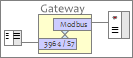
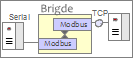
Capture, Store, Forward - MODBUS Slave or Gateway functions
Communication at lower data packet level is possible thus allowing to capture, store and forward of MODBUS data packets or transmit replies. Monitoring MODBUS data packets, simulating a MODBUS Slave or building a protocol converter / gateway is possible. Simulating a MODBUS Slave can be very handy while testing the software (slave examples available).
Supported Protocols
The SuperCom MODBUS Library enables secure and stable data communications with different Modbus devices from different manufacturers. It supports almost all known Modbus options and variations.
The SuperCom MODBUS Library implements the standard MODBUS protocol for serial and TCP/IP connections* based on the official specification by the MODBUS organization. SuperCom supports MODBUS ASCII and MODBUS RTU protocol with serial interfaces (RS-232, RS-422, RS-485, Modem, TAPI) and the MODBUS TCP/IP (MODBUS/TCP) and Open MODBUS TCP with TCP/IP networks.
*A corresponding SuperCom license (Serial and/or TCP/IP) assumed.
The SuperCom MODBUS Protocol Library is a very complete MODBUS protocol stack!
Also included, non standard variants of the MODBUS protocol e.g. RTU over IP (also known as MODBUS RTU/IP, MODBUS RTU over TCP) enable the SuperCom application to talk to OMTS devices (OMTS = Out of the MODBUS TCP/IP specification). Since not an official specification, additional names and variants may exists.
Small SuperCom MODBUS Server examples can be found here.

How to use?
The SuperCom MODBUS Protocol Protocol Library can be used over any communication link supported by SuperCom (currently Serial (RS-232, RS-422, RS-485, Modem, TAPI), TCP/IP, ISDN). For a list of available SuperCom packages containing MODBUS protocol, see the following chart.
The use of one common API for Serial, TCP/IP and ISDN applies here too.
MODBUS Server Simulator
Speeds up development process. Create your own Modbus devices to test or deliver using a few functions only.
The Modbus server support included in this software also provides Modbus simulator software. Especially in the SuperCom Suite package. An easy to use and fast working test environment to deliver quality software. It also supports the creation of software based (virtual) Modbus devices for Modbus clients.
License Information
Executables developed using SuperCom MODBUS Protocol Module can be distributed royalty free. More ...
Supported compilers
C#, C++, Delphi, Visual C++, Visual Basic, Visual Basic NET, C++ Builder, Borland C/C++, Microsoft C/C++, MinGW, Borland Pascal, Java, LabVIEW, PowerBuilder, Python, PureBasic, VBA and other Windows programming tools (MS .NET ?).
Examples
for C/C++, C#, Visual C++, C++ Builder, Java, Delphi, Pascal, Python, Visual Basic, Visual Basic NET (VB .NET), LabVIEW, PureBasic, ...
The SuperCom Suite contains more example programs and especially Modbus Slaves samples supporting multiple clients.
Technical Support
As with all SuperCom products, free technical support is included. In addition to the large amount of functions contained in the SuperCom software, our customers can enjoy our extensive Insider Infos and many more to assist in even difficult constellations.
A flexible and portable library for use in Windows  or Linux
  Applications*.
* Please select the corresponding Windows or Linux product numbers.
What to order?
You will find promotional combinations with MODBUS (e.g. SuperCom Serial incl. MODBUS, SuperCom for TCP/IP incl. MODBUS, SuperCom Protocol Engine, SuperCom Suite).
Note: The order code 638 or 638400 is needed only when the MODBUS protocol module is ordered later in addition to a SuperCom package. The most preferable way (incl. the best price) is buying one package from the above pricelist already including the MODBUS functionality.
FAQ
Q: I need to connect to many different Modbus server.
A: Using the SuperCom Modbus software library an application can simoultaneously connect (see also SuperCom Suite to many different Modbus server using connections over serial cable, modem, TCP/IP, ISDN, GSM etc.
Q: Is it possible to convert serial Modbus/RTU or ASCII Data to Modbus/TCP ?
A: Yes! The SuperCom Suite supports serial and TCP/IP connection. With SuperCom Suite it is very easy to handle simoultenesouly many serial and TCP connections. Next, the low-level Modbus functions receive serial Modbus data and forward it via Modbus TCP and vice versa. This way you build easily a COM-Server simulator (Gateway) in your application.
Q: I need to simulate devices mainly for testing
A: Using the SuperCom Modbus Server (slave) functionality one can create one or more Modbus server within the same application and simulate many different Modbus devices. Only a few functions involved. The SuperCom Modbus server is handling requests automatically or, if required, reports to the application for manual handling.
It really requires little code to build a Modbus server and many samples included to begin with.
What developers say
... and the client is now polling real fast consuming low CPU. Great support.
Rob, USA.
I'm really impressed. Very sophisticated software that works fast and is flexible to use. Excelent work guys!
Pete, UK.
Great library, the GUI is not blocked.
Ch.., USA.
The slave application works like a charm.
Jon, Australia.
We were really surprised by the short reaction times and how smoothly it works even on multiple concurrent TCP connections.
M.., Poland.
Works faster than expected!
S.., France.
... issue solved, thanks.
P.., The Netherlands.
|
MODBUS library | MODBUS RTU | MODBUS ASCII | MODBUS TCP | MODBUS over IP | MODBUS Serial Library | MODBUS RS-485 | MODBUS Slave | MODBUS sample C, C++, C#, Pascal, Delphi, Java, Pascal, Python, LabView, Visual Basic, VBA | MODBUS C library | MODBUS C++ library | MODBUS C# library | MODBUS Delphi library | MODBUS Pascal library | MODBUS Visual Basic library | LabVIEW Modbus library | MODBUS RTU example | MODBUS C Code Example | MODBUS slave simulator
|
Home Back
|
|
It Simply Works!
Updated on: 2024-03-13 12:12:50
|
| |


 32 Bit and 64 Bit Versions available!